
Close CRM Review 2026: Is It Worth It?
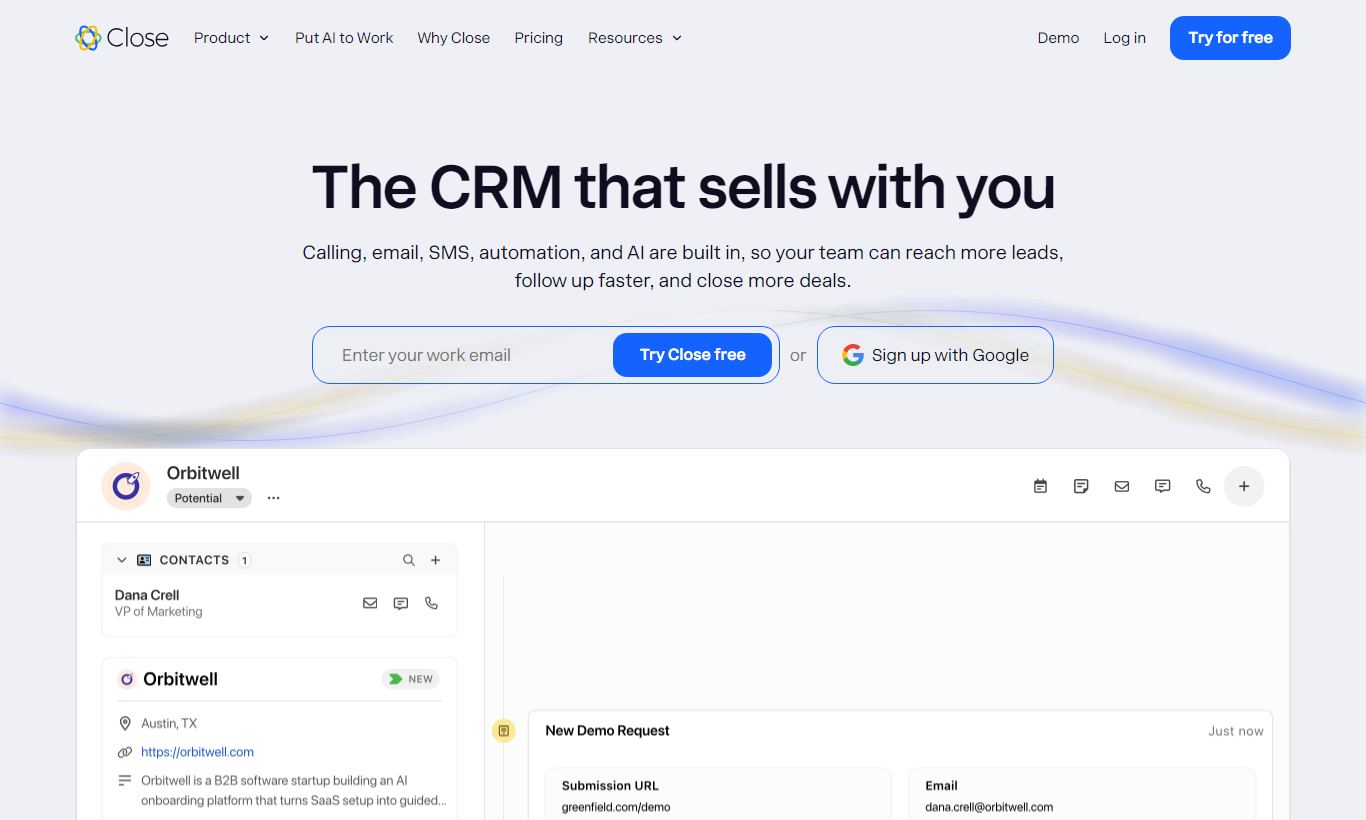
Close is a sales-focused CRM built for inside sales teams who live in the phone, email, and follow-up cycle. Unlike broad-purpose CRMs such as Salesforce or HubSpot, Close bets its entire product on helping reps make more calls, send better emails, and close deals faster, all without switching between a dozen tabs. With built-in calling, SMS, email sequences, and a Power Dialer, it cuts down on tool sprawl for outbound-heavy teams. Pricing starts at $49/user/month (billed annually) and scales to $139/user/month, which puts it firmly in the mid-market range. It earns its price for teams where volume outreach drives revenue. Smaller teams, or those needing deep marketing automation, should look elsewhere. Close scores 4.4/5. It's a focused, high-velocity CRM that delivers on its core promise.
What we love
Watch out for
Close at a glance
What to test in your Close trial
14-day free trial
- Make 20+ calls using Power Dialer and time how long vs. your current process
- Build a multi-step email sequence with manual call tasks and enroll real leads
- Set up a Smart View for your highest-value leads with no activity in 14 days
- Log a real call, email, and SMS and verify all three appear in the activity timeline
- Import your actual lead list and test if automatic logging reduces manual data entry
- Decide before day 14 if the $99/user/month cost saves enough time to justify vs. separate tools
Quick Verdict
Close is one of the few CRMs that actually feels like it was designed by salespeople, not by software architects. Every workflow, from logging a call to enrolling a lead in a multi-step email sequence, is built to cut down on friction for the rep. If your team's main motion is outbound calling, high-volume email outreach, or structured follow-up sequences, Close removes nearly every reason to leave the CRM during a workday.
Close is unapologetically narrow in scope, though. It won't replace your marketing automation platform, won't manage complex multi-stage project workflows, and doesn't offer the depth of custom objects that enterprise teams often need. If you're running a pure inside sales operation (SDRs, account executives, or a founder-led sales team that needs to move fast), Close is one of the best tools on the market. Everyone else should read the caveats carefully before committing.
Start Your Free Trial →What is Close?
Close was founded in 2013 by Steli Efti and the team behind Elastic (formerly ElasticSales), a sales-as-a-service startup. The product was built internally to handle their own high-volume prospecting work, then spun out as a standalone SaaS. That origin matters. Close was tested on real sales floors before it was ever sold to customers, and that explains why its UX choices often feel more practical than polished. The company is bootstrapped and independent, so product decisions tend to be driven by customer need rather than investor-mandated feature bloat.
Today, Close serves thousands of SMB and mid-market sales teams globally, with particular traction in SaaS, recruiting, real estate, and financial services. These are all industries where high call and email volume is table stakes. Close isn't trying to compete with Salesforce for enterprise Fortune 500 contracts. It's built for the 5 to 100 rep inside sales team that needs to move fast, log everything automatically, and get clear pipeline visibility without a full-time CRM admin.
Key Features
Feature Checklist
Built-In Calling with Power Dialer
This is the crown jewel. Close includes native VoIP calling in every paid plan, so there's no third-party integration required. Reps can call leads directly from the CRM, and every call gets logged automatically with duration, outcome, and optional recording. The Power Dialer takes this further. It lets reps queue up a list of leads and blast through calls back-to-back, automatically moving to the next contact when a call ends. For an outbound SDR doing 80+ calls a day, this single feature can recover hours of productivity per week compared to manual dialling. A Predictive Dialer is also available on higher plans for teams that want algorithmic call pacing. Local presence dialling, where the system displays a local area code to the prospect, is available as an add-on, and it consistently improves answer rates in outbound campaigns.
Email Sequences and Automation
Close's Sequences feature lets reps (or managers) build multi-step email cadences that combine automated touchpoints with manual tasks. A typical sequence might send an automated intro email on day 1, prompt the rep to make a call on day 3, automatically send a follow-up email on day 5, and escalate to a manager task if there's still no reply by day 10. Unlike marketing automation tools, these sequences are built for one-to-one personalised outreach rather than bulk broadcasting, though you can still enrol hundreds of leads at once. Sequences also support A/B testing of subject lines, which helps teams improve messaging without guessing.
Smart Views and Lead Segmentation
Smart Views are saved, dynamic filters that act like live reports on your pipeline. A rep might set up a Smart View for "all leads in San Francisco with no activity in 14 days and a deal value over $5,000," and it updates in real time as leads move in and out of those criteria. This removes the need to manually sort through a pipeline before every session. Managers use Smart Views to build accountability dashboards: "show me every open opportunity my team hasn't touched this week." It sounds like a simple feature, but it becomes something you rely on daily once you start using it.
SMS and Two-Way Messaging
Close supports inbound and outbound SMS, which matters more every year for teams selling to consumers or working in industries where email open rates have collapsed. SMS conversations appear in the same activity timeline as calls and emails, so a rep can see the full communication history in one scroll. Bulk SMS is available for broadcasting to segmented lead lists, with personalisation tokens to keep messages from feeling generic. It's handled natively, no Twilio configuration required, though the underlying infrastructure runs on Twilio.
Reporting and Pipeline Analytics
Close's reporting suite covers activity metrics (calls made, emails sent, tasks completed), pipeline metrics (deals created, won, lost, average deal size), and user-level leaderboards that are especially useful for frontline sales managers. The activity overview lets managers compare rep performance side by side, which builds accountability without the overhead of manual tracking. Custom report building is available on higher plans. One honest limitation: Close's reporting is solid for pipeline and activity tracking, but it doesn't match the depth of dedicated BI tools or even Salesforce's report builder for complex multi-object analysis.
Integrations and API
Close integrates natively with Zapier, Slack, Zoom, Google Workspace, Microsoft 365, and a range of prospecting tools including Apollo.io and Hunter. Its REST API is well documented, and technical teams actively use it to sync Close with proprietary data warehouses or build custom lead routing logic. For teams that use HubSpot for marketing, a native two-way sync is available, so marketing-qualified leads can flow into Close for sales follow-up without data duplication.
Pricing
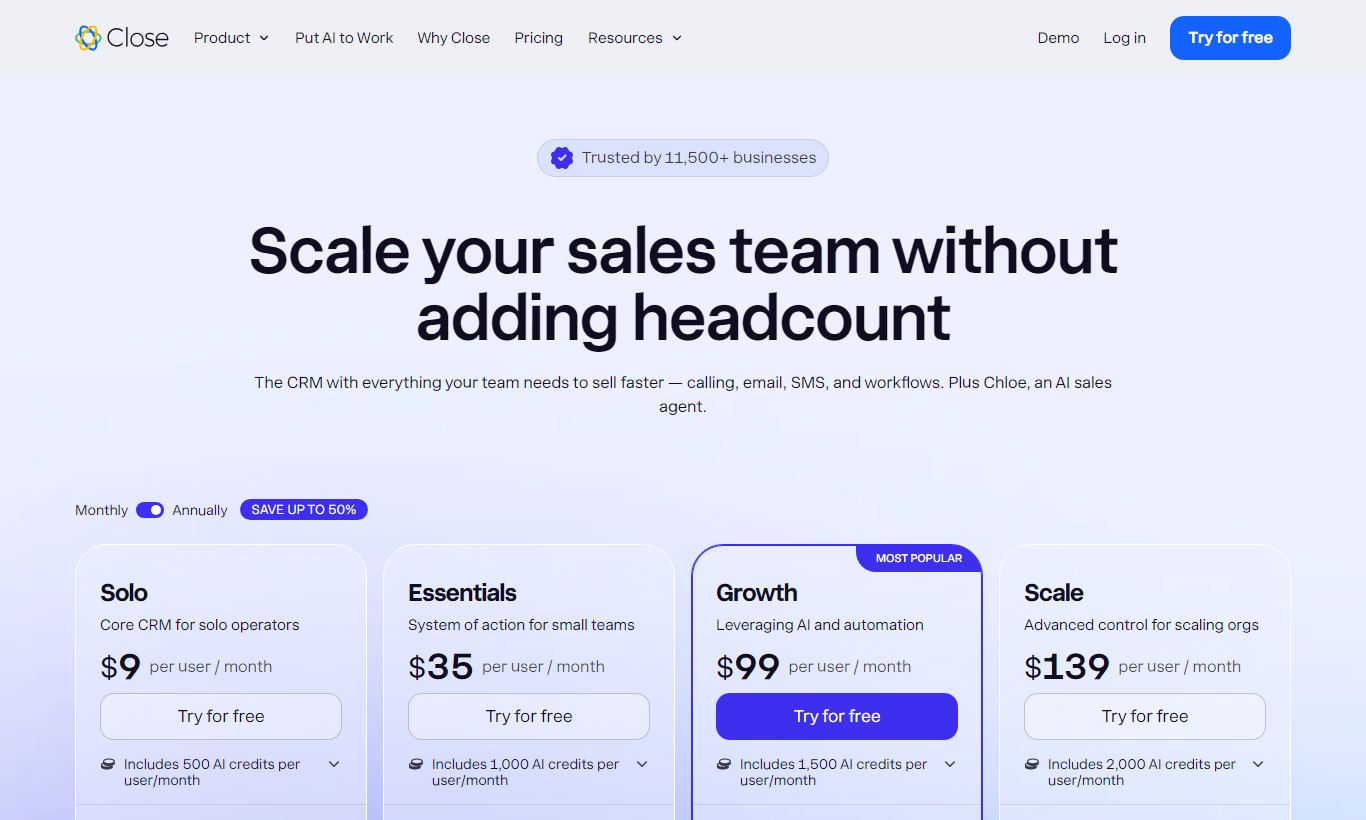
Close offers four paid plans, billed monthly or annually. All plans include a 14-day free trial with no credit card required. That's a real commitment signal from a vendor that trusts its product.
- Startup - $49/user/month (billed annually; $59/user/month monthly): Up to 3 users. Includes built-in calling, email, SMS, Smart Views, and basic reporting. No Power Dialer or Sequences. Best for tiny teams just getting started.
- Professional - $99/user/month (billed annually; $119/user/month monthly): Unlimited users. Adds email Sequences, Power Dialer, bulk email, and advanced reporting. This is the sweet spot for most growing inside sales teams.
- Enterprise - $139/user/month (billed annually; $169/user/month monthly): Adds Predictive Dialer, call coaching, custom roles and permissions, dedicated account management, and priority support. Built for larger teams with compliance and coaching needs.
There's no permanent free plan. The 14-day trial is available on all tiers. Call minutes are included in the base plans (with fair-use caps), and international calling is billed at per-minute rates. Local presence dialling and some premium add-ons carry extra fees. A 10-person sales team on the Professional plan should expect to pay roughly $990/month billed annually. That's a real line item, and it's worth weighing against the cost of running separate dialler, email, and CRM subscriptions.
What We Love
- Native calling and Power Dialer cut out tool switching: Reps handle an entire outbound session, calls, voicemail drops, notes, follow-up tasks, without ever leaving Close.
- Activity logging happens automatically: Every call, email, and SMS gets logged against the lead record with zero manual input from reps. Pipeline data stays clean because no one has to remember to update it.
- Smart Views keep the pipeline honest in real time: Dynamic, filterable saved views let reps and managers pull up exactly the right leads at the right time. No one has to build manual reports.
- Email Sequences built for 1-to-1 personalisation: Unlike marketing blast tools, Close Sequences protect deliverability by sending from individual rep inboxes and support detailed personalisation tokens.
- 14-day free trial, no credit card needed: The trial is fully functional and supports real data import, so teams can test Close against their actual sales workflow before they spend a dollar.
Watch Out For
- No free plan and a relatively high per-seat cost: At $99/user/month for the Professional plan, Close is a real investment. Solo founders or micro-teams may struggle to justify it next to lighter alternatives.
- Limited marketing automation capabilities: Close is built for sales, not marketing. If you need lead scoring, landing pages, or complex behavioural email triggers, you'll need a separate tool like HubSpot or ActiveCampaign alongside it.
- Reporting depth lags behind enterprise CRMs: Custom multi-object reporting and advanced forecasting tools aren't as mature as Salesforce's reporting engine. That's a real gap for data-heavy RevOps teams.
- International calling costs can add up quickly: Domestic US/Canada calling is generous, but teams with high international call volumes report that per-minute charges become a meaningful extra expense on top of already-high seat fees.
Who Is It Best For?
The outbound SDR team at a B2B SaaS startup (5 - 30 reps): This is Close's primary home. A team running structured cold outreach, calling, sequenced emails, SMS follow-up, will find that Close's all-in-one design removes the need for a separate dialler (like Aircall or Kixie), a separate sequencing tool (like Outreach or Salesloft), and a CRM (like Pipedrive). The consolidation alone often justifies the price.
A sales-led founder or VP of Sales scaling a team from scratch: Close's clean onboarding, sensible defaults, and lack of required CRM admin overhead make it one of the fastest tools to deploy for a team that doesn't have a RevOps function yet. A founder can have the team fully operational in an afternoon.
Inside sales teams in high-velocity verticals like recruiting, insurance, or real estate: Industries where the sales cycle is measured in days, not months, and where call volume is a primary performance metric get outsized value from Close's dialler, voicemail drop, and call recording features. A 10-rep real estate sales team making 500 collective calls per day would struggle to find a better-integrated tool at any price.
How Does It Compare?
HubSpot Sales Hub: HubSpot offers a broader platform with marketing, CMS, and service tools. But its sales-specific features like calling and sequences require the Sales Hub Pro tier ($100/user/month), and native calling quality and Power Dialer depth don't match Close. For teams that want a true all-in-one marketing-and-sales platform, HubSpot wins. For pure sales execution, Close is sharper. See our full Close vs HubSpot breakdown.
Pipedrive: Pipedrive is a popular alternative at a lower price point (~$24 - $60/user/month), with an excellent visual pipeline UI. But Pipedrive lacks native calling and its sequencing features are less mature. Most teams end up paying for add-ons that bring the total cost closer to Close anyway. Close wins on integrated communication depth. Pipedrive wins on price for teams that mostly need deal tracking. See our Close vs Pipedrive comparison.
Final Verdict
Close earns a strong 4.4 out of 5 for inside sales teams who prioritise call volume, structured email outreach, and fast pipeline management. The built-in calling stack (VoIP, Power Dialer, voicemail drop, call recording) alone replaces tools that would cost as much as the CRM itself. Sequences, Smart Views, and automatic activity logging mean reps spend more time selling and less time on admin work. For the right team, this changes daily rep productivity in a real way, not just at the margins.
The caveats are real, though. If you need enterprise-grade reporting, deep marketing automation, or a free tier to onboard a tiny team, Close will frustrate you. And at $99/user/month for the plan most teams actually need, it's a serious budget commitment. But for a 10 to 50 person inside sales team that makes calls and sends email sequences for a living, Close consistently punches above its weight class. Take the 14-day free trial, import your leads, and run a real sprint. The product tends to sell itself once reps feel how much less friction there is in a typical day.
Try Close Free →FAQ
How much does Close CRM cost?
Close CRM starts at $49/user/month (Startup plan, billed annually, up to 3 users). The Professional plan, which includes email Sequences and the Power Dialer, costs $99/user/month annually. The Enterprise plan runs $139/user/month annually and adds the Predictive Dialer plus call coaching tools.
Does Close CRM have a free plan?
No. Close doesn't offer a permanent free plan. Every paid plan comes with a 14-day free trial that requires no credit card, so teams get full access to test the product with their own data.
Is Close CRM worth it for small teams?
For small teams (under 5 reps) doing high-volume outbound sales, yes. This is especially true if you're currently paying separately for a dialer, an email sequencing tool, and a CRM, since Close rolls all three into one. For small teams doing low-volume, relationship-driven sales, cheaper tools like Pipedrive may cost less overall.
How does Close CRM compare to HubSpot?
HubSpot is a broader platform that covers marketing, a CMS, and customer service tools. Close is narrower and goes deeper on sales execution, particularly calling and email sequences. For pure inside sales teams, Close usually beats HubSpot on rep-level productivity. For teams that need marketing and sales in one platform, HubSpot fits better.
Does Close CRM include built-in calling?
Yes. Close includes native VoIP calling on all paid plans, with automatic call logging, recording, and voicemail drop. The Power Dialer, built for sequential high-volume calling, comes with Professional and Enterprise plans. You won't need a third-party integration for basic calling.
What industries use Close CRM most?
Close sees the strongest adoption in SaaS, recruiting, real estate, financial services, and insurance. These industries share high outbound call volume, short-to-medium sales cycles, and a need for structured follow-up cadences.
Can Close CRM integrate with other tools?
Yes. Close offers native integrations with Zapier, Slack, Zoom, Google Workspace, Microsoft 365, and Apollo.io, among others. A well-documented REST API lets technical teams build custom integrations. A two-way sync with HubSpot is also available for teams running marketing automation alongside Close for sales.
We may earn a commission when you click affiliate links. This never affects our editorial scores.
| Best for | CRM built for inside sales |
| Category | CRM Software |
Answer a few quick questions and we'll match you to the best tool for your needs.
→ Suggest a Tool