
Loom Review 2026: Is It Worth It?
Loom is an asynchronous video messaging platform. Record your screen, webcam, or both, then share a link instantly, with no file attachments and no scheduling required. It's built for teams that want to swap out lengthy meetings and endless email threads for clear, watchable video messages. In 2026, Loom has beefed up its AI features quite a bit: auto-generated transcripts, AI-written summaries, action-item detection, and a "Loom AI" editing suite that strips out filler words and silences automatically. Pricing starts free (25 videos, 5 minutes each) and scales to $12.50/user/month on Business. For remote and hybrid teams, async-first communicators, and anyone who has to explain complex processes on repeat, Loom pays for itself quickly. It won't replace a full video production tool and has no native project management, but as a way to speed up communication, it's one of the most polished tools out there.
What we love
Watch out for
Loom at a glance
What to test in your Loom trial
14-day free trial
- Record a product demo or process walkthrough and test AI filler-word removal and silence trimming
- Embed a timestamped CTA button in a video and track clicks to measure if it drives action
- Share a video with teammates and check the per-second heatmap to see where viewers drop off or rewatch
- Embed a Loom video directly in a Jira ticket or Confluence page to test the Atlassian integration
- Record with strong accent or technical terminology and review auto-transcript accuracy for your content
- Decide whether unlimited recording length and AI summaries justify the $12.50/month cost before trial ends
Quick Verdict
Loom earns its place in the modern productivity stack. If your team regularly loses hours to "this could have been an email" meetings, or you've typed out a three-paragraph Slack message explaining something that would take 45 seconds to show, Loom fixes that problem well. Record once, share a link, and let people watch on their own schedule. With Loom's 2025-2026 AI upgrades, the platform now transcribes, summarises, and even edits your recordings automatically, turning what used to be a manual post-production step into a single click.
It has limits, though. The free tier is genuinely restrictive (25 videos capped at 5 minutes each), and organisations that need advanced security controls or SSO will have to commit to the Business tier. Still, for most remote teams, knowledge workers, and client-facing professionals, Loom's mix of frictionless recording, instant sharing, and AI-assisted polish makes it a worthy investment. Start Your Free Trial →
What is Loom?
Loom launched in 2015. Atlassian acquired it in 2023 for roughly $975 million, a number that shows how seriously enterprise software buyers take asynchronous video communication. The product is built around one simple insight: showing beats telling. Instead of writing a detailed bug report, a developer records a 90-second walkthrough of the broken flow. Instead of scheduling a 30-minute onboarding call, an HR manager records a guided tour of the company wiki. The recipient gets a link in their inbox or Slack and can watch it in any browser, no account needed.
Loom sits at the crossing point of async communication, screen recording, and AI productivity tools. Its main audience is knowledge workers at SMBs and mid-market companies, especially teams spread across time zones. The Atlassian integration has also pulled it deeper into developer and product teams already working in Jira and Confluence. As of 2026, Loom runs as a Chrome extension, a Mac and Windows desktop app, and a mobile app for iOS and Android.
Key Features
Feature Checklist
Screen and Camera Recording
Loom's core recording engine supports four capture modes: screen only, camera only, screen plus camera (the classic "bubble cam" picture-in-picture), and an audio-only option. You can record your full desktop, a specific application window, or a selected browser tab, which matters for demos where you don't want to accidentally expose a notification. Recording starts in one click from the Chrome extension or desktop app, and the shareable link is live before you've even finished recording. For a sales engineer demoing a product to a prospect, that instant availability is genuinely useful. The link can be pasted into a follow-up email while the call is still wrapping up.
Loom AI - Transcription, Summaries, and Editing
This is where the platform has made its biggest strides. Every recorded video now gets an auto-generated transcript synced to the video timeline, which makes content searchable and accessible. On Business and above, Loom AI goes further. It produces a structured written summary with key points and detected action items, which appear below the video for viewers who want the gist before committing to watch. The AI editing suite, branded as "AI Editing," automatically removes filler words ("um", "uh", "like"), trims long silences, and can stitch out mistaken takes. For anyone who isn't a natural on-camera communicator, this feature alone can justify the upgrade from free to paid. The AI summary is editable too, so you can correct misattributed action items before sharing.
Video Engagement Analytics
Loom tracks who watched your video, how far they got, whether they rewatched any sections, and whether they clicked any CTAs embedded in the video. For a customer success manager sending onboarding videos, this data is immediately useful. If 80% of new users drop off at the two-minute mark, that's a signal to restructure the content. Viewer heatmaps are available on Business tier and above, giving a colour-coded overlay of which moments in the video attracted the most replays. Reactions and time-stamped comments are also supported, which allows real async conversations anchored to specific moments in the video.
Interactive CTAs and Links
Within any video, you can embed a clickable call-to-action button that appears at a specific timestamp, for example a "Book a Demo" button that fires at the 60-second mark of a sales prospecting video. You can also add password protection, set expiry dates on shared links, and require viewer email capture before playback begins. These are features that would otherwise require a dedicated video hosting platform like Wistia, which makes Loom a genuine two-for-one for teams that send videos externally.
Spaces, Playlists, and Team Organisation
Loom Spaces function like shared folders. You can create a Space for a specific project, team, or client, then organise videos into playlists within it. A product team might maintain a "Sprint Demos" space where engineers drop their weekly update recordings, replacing the traditional live demo meeting entirely. Spaces support custom access controls, public, private, or invite-only, and can be embedded in Confluence pages or shared externally. Playlists make it easy to build lightweight video libraries, such as an onboarding course or a client FAQ collection, without any extra tooling.
Integrations and Atlassian Ecosystem
Loom integrates natively with Slack, Notion, Jira, Confluence, Gmail, Google Docs, HubSpot, Salesforce, and Intercom, among others. The Jira and Confluence integrations run the deepest: Loom videos can be embedded directly in Jira tickets, and Confluence pages auto-render Loom links as inline players. For teams already on the Atlassian stack, this is an easy addition. A Zapier connection opens up further automation possibilities, though more complex workflow automation still needs manual setup.
Pricing
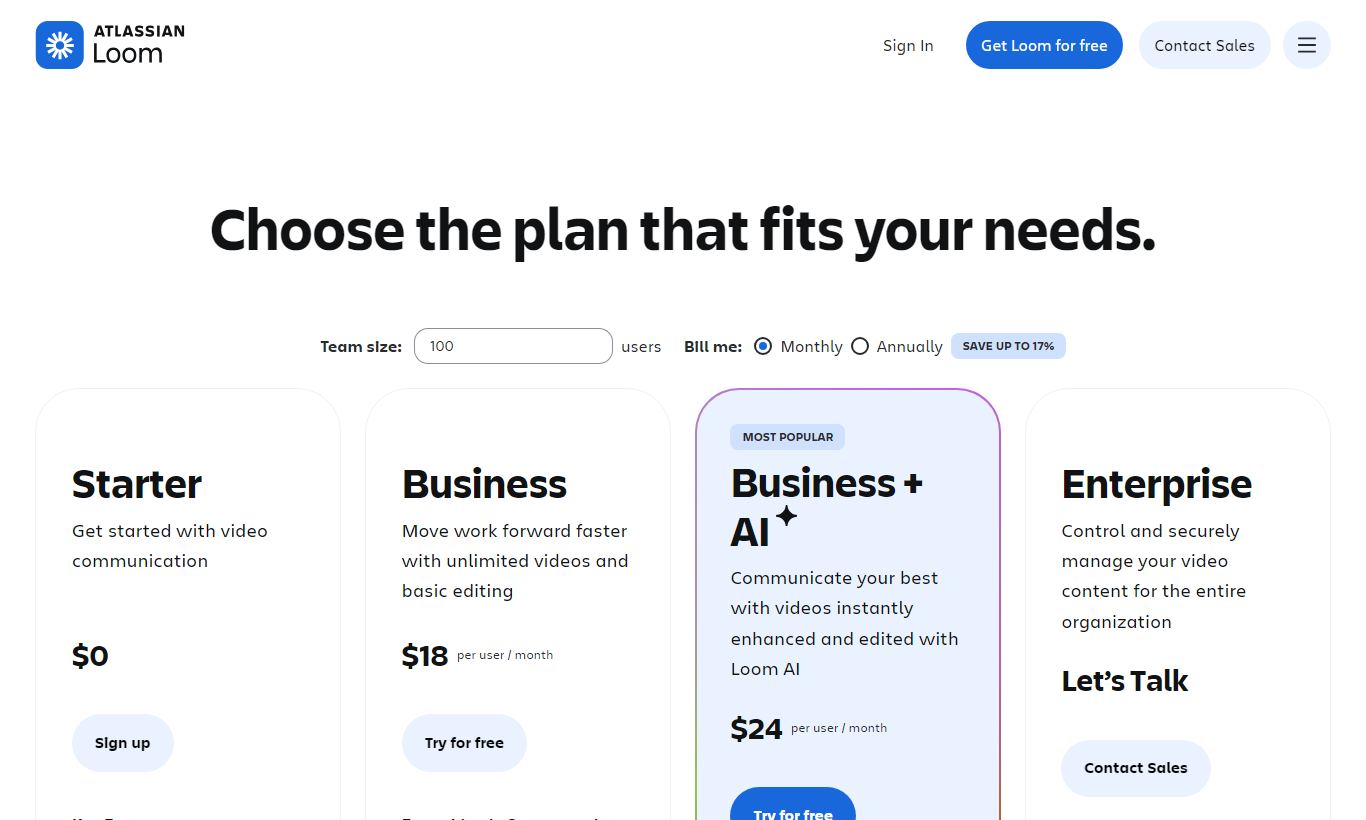
Loom offers four tiers. All paid plans are billed per user per month, and annual billing brings meaningful discounts.
Starter (Free): Up to 25 videos per person, maximum 5 minutes per video, unlimited viewers, basic reactions and comments. This tier is deliberately limited. The 5-minute cap will frustrate anyone recording product walkthroughs or training content, but it's a fair way to test the core workflow.
Business ($12.50/user/month, billed annually; $15/user/month monthly): Unlimited videos, unlimited recording length, Loom AI features (transcripts, summaries, AI editing), viewer analytics and heatmaps, custom CTAs, password protection, and removal of the Loom branding from the viewer page. This is the tier where Loom turns into a complete professional tool. A 14-day free trial is available.
Business + AI ($16/user/month, billed annually): Everything in Business plus expanded Loom AI capabilities, including deeper editing tools and priority AI processing. It suits teams that produce high volumes of external-facing videos and need faster turnaround on AI features.
Enterprise (custom pricing): SSO/SAML, advanced admin controls, custom data retention policies, dedicated customer success, and SLA-backed support. Organisations with strict compliance or security requirements will need this tier. Pricing is negotiated directly with Loom's sales team.
Loom also offers a free 14-day trial of the Business tier, the best way to test AI features before committing. Education and non-profit discounts are available on request.
What We Love
- Instant shareable links before recording even finishes. The link goes live the moment you start, so you can paste it into a message while still recording. No more waiting around for an upload to finish, which is where a lot of competing tools fall down.
- AI filler-word removal and silence trimming in one click. Recordings that would otherwise need manual editing in a separate tool get polished automatically. That saves 10 to 20 minutes per video if you're not an editor by trade.
- Viewer heatmaps that pinpoint drop-off and rewatch moments. Basic view-count analytics won't tell you this much. This per-second engagement data lets you fix content based on actual evidence instead of a hunch.
- Deep Atlassian integration means no context-switching for Jira or Confluence users. Videos embed right in tickets and pages, so project context stays in one place instead of scattered across copied links.
- Embeddable CTAs with timestamp targeting. You can fire a "Book a Call" button at an exact moment in a sales video. That turns Loom into a lightweight video marketing tool, not something you'd use just for internal notes.
Watch Out For
- The free tier's 5-minute cap is a genuine blocker for real use cases. Most product demos, onboarding walkthroughs, or feedback sessions run longer than 5 minutes, so free users hit the wall almost immediately. It's less a trial and more a taster.
- AI transcription accuracy struggles with strong accents and heavy technical jargon. Specific API endpoints, product names, and non-English-origin words are frequently mistranscribed. You'll need to fix these by hand before sharing summaries externally.
- No native video editing beyond AI-assisted trims. If you need to cut to a different screen mid-recording, add B-roll, overlay graphics, or splice two recordings together, you'll need a separate tool like Camtasia or ScreenFlow. Loom is built for communication, not production.
- SSO and advanced security controls sit behind Enterprise pricing. Mid-sized companies with real IT security requirements but budgets that don't stretch to a custom Enterprise contract are left with a gap between what Business offers and what their compliance team actually needs.
Who Is It Best For?
Remote and hybrid product teams shipping across time zones. A product manager in London who needs to brief an engineering team in Singapore doesn't want to hunt for a meeting slot that works for both cities. A two-minute Loom walking through a new feature spec, embedded directly in the Jira ticket, replaces the briefing call entirely and leaves a permanent record that new team members can watch later. This is where Loom does its best work.
Customer-facing professionals who send personalised video outreach. Sales development reps record 60-second personalised prospecting videos. Customer success managers send recorded product tips to at-risk accounts. Support agents record quick "here's how to fix that" walkthroughs instead of typing out lengthy ticket responses. The combination of engagement analytics and CTA buttons makes these videos trackable and actionable in a way email attachments never are.
Internal trainers and onboarding leads at growing companies. An HR or enablement professional who keeps explaining the same process, how to submit expenses, how to use the CRM, how to request PTO, can record it once, organise it in a Loom Space, and share the playlist link instead of scheduling recurring onboarding sessions. As headcount grows, the time saved scales right along with it. Loom isn't a full LMS, but for informal, process-level training it's far less friction than any dedicated course builder.
How Does It Compare?
Loom vs. Vidyard: Vidyard targets enterprise sales teams with deeper CRM integrations, more advanced video hosting, and a wider set of analytics. It's stronger for outbound sales video campaigns, but it costs more and takes far longer to set up. For internal async communication, Loom is faster and simpler. See our full breakdown: Loom vs Vidyard.
Loom vs. Clip (by Dropbox) / Tella: Tella is a rising challenger with more visual customisation. Animated backgrounds, scene cuts, and a more polished viewer experience make it appealing to creator-adjacent professionals. It doesn't match Loom on team management features, Spaces, viewer analytics, or enterprise-grade integrations, though. Tella wins on looks for solo creators. Loom wins on workflow for teams. Loom vs Tella.
Final Verdict
Loom is one of the rare productivity tools that delivers on its core promise without significant asterisks. Recording a video, getting a shareable link in seconds, and watching a viewer react to it with time-stamped comments feels genuinely different from any other form of async communication. It's more personal than text and less demanding than a live call. The AI features added in 2025 and 2026 aren't window dressing. Auto-summaries and filler-word removal solve real pain points for real users, and they're well-executed enough to trust in external communications.
The free tier won't serve you for long, and if your organisation needs SSO you'll need to negotiate Enterprise pricing. But for remote teams, async-first companies, and anyone who communicates complex processes regularly, the Business plan at $12.50/user/month represents strong value. Start with the 14-day trial of Business. You'll know within the first week whether it belongs in your stack.
Try Loom Free →FAQ
Is Loom free to use?
Yes. Loom offers a free Starter plan that includes up to 25 videos per creator, capped at 5 minutes each. It covers basic recording, sharing, and viewer reactions. For unlimited video length and AI features, you'll need the Business plan at $12.50/user/month (billed annually), which includes a 14-day free trial.
How much does Loom cost in 2026?
Loom's Business plan is $12.50/user/month on an annual contract, or $15/user/month on a monthly basis. The Business + AI plan runs $16/user/month annually. Enterprise pricing is custom and negotiated directly with the sales team. A limited free Starter plan is permanently available.
Is Loom worth it for small teams?
For small remote or hybrid teams, Loom's Business plan usually pays for itself fast. Replace even one 30-minute team meeting a week with async Loom updates, and the time saved across the team beats the cost of the subscription inside the first month. The payoff is clearest for teams spread across time zones.
How does Loom compare to Vidyard?
Vidyard is the stronger pick for enterprise sales video workflows, with deeper CRM integrations and more thorough video hosting analytics. Loom sets up faster, suits internal async communication better, and costs less for mid-sized teams. If your main goal is replacing internal meetings, pick Loom. If you're building a full outbound video sales programme, take a hard look at Vidyard.
Does Loom have AI features?
Yes. On the Business plan and above, Loom AI provides auto-generated transcripts, AI-written video summaries with key points and action items, automatic filler-word removal, and silence trimming. These features apply to every new recording, and you can edit them before sharing.
Can viewers watch Loom videos without an account?
Yes. Anyone with the link can watch a Loom video in any browser without creating an account. Creators can optionally require email capture or set a password before playback, both available on paid plans. This easy viewing setup is one of Loom's strongest advantages over older video-sharing methods.
What are the main limitations of Loom?
The free tier's 5-minute recording cap is the most commonly cited frustration. Beyond that, Loom has no native multi-clip editing or B-roll support, AI transcription can struggle with accents or technical vocabulary, and SSO is restricted to the Enterprise plan. It's a communication tool, not a video production suite.
Is Loom secure enough for enterprise use?
Loom encrypts videos in transit and at rest, and the Business plan includes password-protected sharing and link expiry controls. Full enterprise security features, including SSO/SAML, advanced admin controls, and custom data retention policies, require the Enterprise plan. Organisations in regulated industries should review Loom's security documentation and request a data processing agreement before deployment.
We may earn a commission when you click affiliate links. This never affects our editorial scores.
| Best for | — |
| Category | AI & Productivity |
Answer a few quick questions and we'll match you to the best tool for your needs.
→ Suggest a Tool